Use SQLite tools through MCP
Start a local SQLite MCP server, verify its tools with a small Python client, and then give those tools to an URSA execution agent in the dashboard. By the end, the agent will create a database, generate data, and return a plot as an artifact.
This is a local learning example, not a production database service. The server
restricts database files to sqlite_data/ and permits only read-only queries
through its query tool.
Prepare the example
Clone the URSA repository, open a terminal in its root, and enter this example
directory. Then let uv create an isolated environment and install the example,
URSA, and the dashboard.
The important files are:
sqlite_mcp.py, the MCP server and SQLite toolstest_sqlite_mcp.py, a direct client that exercises each toolsqlite_data/, which the server creates when it stores the example databases
Start the MCP server
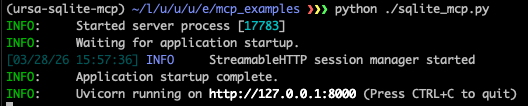
Open your first terminal in this directory and start the server. Leave it running for the rest of the walkthrough.
The server listens for Streamable HTTP connections at
http://127.0.0.1:8000/mcp.
Exercise the tools directly
Open a second terminal in the same directory and run the client harness before introducing URSA. This separates a server or tool problem from an agent configuration problem.
The client discovers the available tools, creates demo_test.db, creates and
describes a table, inserts three rows, and queries them back. A successful run
ends with Test completed successfully.
Connect URSA to the server
Keep the MCP server running. In the second terminal, launch the dashboard from the example environment:
Open the address printed by the command, normally
http://127.0.0.1:8080. In the dashboard:
- Open Settings → MCP Tools.
- Enter
sqlite_demoas the Server name. -
Paste this server configuration:
-
Select Save, then close Settings.
- Create a new Execution Agent session and choose a disposable workspace or another folder you are comfortable allowing the agent to modify.

See the MCP configuration guide for other transports and authenticated servers. See the dashboard guide for credential, workspace, and remote-access details. The broader configuration guide explains how URSA combines its built-in defaults, user configuration, and explicit config files.
Ask the execution agent to use SQLite
Paste the following prompt into the new session and select Send:
Use the sqlite_demo MCP tools to create a database called materials_demo
and a table called tensile_experiments with the following columns:
sample_id as a TEXT primary key, temperature_K as REAL, strain_rate_s as REAL,
grain_size_um as REAL, yield_strength_MPa as REAL, and phase_label as TEXT.

Then generate 100 synthetic rows of data using numpy with reasonable random
distributions: temperature_K uniformly between 250 and 1200, strain_rate_s
log-uniformly between 1e-4 and 1e1, grain_size_um normally distributed around
20 with a standard deviation of 5 and clipped to positive values, and
yield_strength_MPa computed from a simple synthetic relationship where strength
decreases with temperature, increases with strain rate, and increases slightly
as grain size decreases, plus some random noise.

Assign each row a sample_id from sample_001 to sample_100 and a phase_label
of alpha or beta based on whether temperature_K is below or above 700.

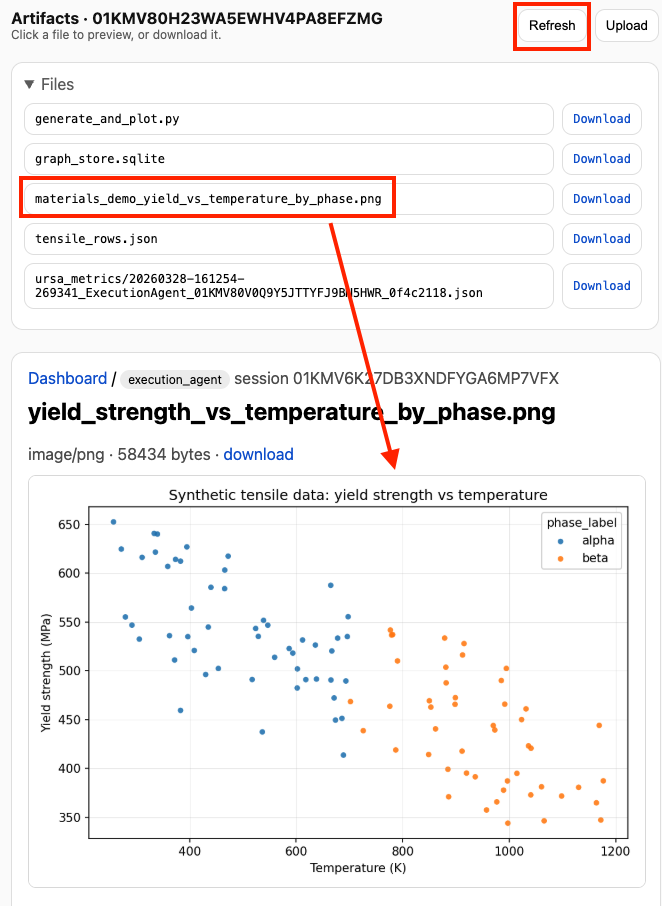
Insert all rows into the table, query the full table back out, and then plot
yield_strength_MPa versus temperature_K with points colored by phase_label.
Save this to an appropriate PNG filename.

Also print a short summary of the table contents and the fitted synthetic
trends you used.
Watch the MCP server terminal as the agent calls its tools. When the run finishes, inspect the stdout summary, then open the Artifacts panel and refresh it if necessary. Your numeric values will vary, but the plot should resemble this result:
You have now tested the same MCP tools at two layers: first with a deterministic
Python client, and then through an URSA agent. Continue with the
execution-agent guide to learn how its workspace
and tool use behave, or adapt sqlite_mcp.py to expose tools for your own local
data source.